Generate on a key color in Midjourney
Midjourney wants atmosphere: a vignette in the corners, a soft glow around the subject, a little dust floating in the light. Every one of those touches turns the background into several slightly different colors, and cutting a background away cleanly needs one. The prompt and the flags below switch them off.
The prompt
The subject is a watercolor autumn oak leaf wreath. Leaves rule the green background out, nothing in an autumn palette is blue, so the wreath renders on pure blue.
watercolor autumn oak leaf wreath, isolated on a completely flat, uniform, solid pure blue (#0000FF) digital chroma-key background. The pure blue background fills the image edge to edge like a flat digital chroma-key screen with no gradient, staying at full brightness inside every gap and opening in the subject; no reflection or tint of pure blue on the subject. Every edge of the subject is crisp, sharp and hard against the pure blue, with no soft, blurry, feathered or glowing transitions, no depth-of-field blur, no haze or halo; inside every hole and gap the pure blue stays at full brightness right up to the edge. Shaded parts of the subject keep their own natural color, never a pure blue tint. The entire subject is centered and completely inside the frame with at least 10% empty background margin on every side, nothing cropped or touching the image edges. No frame, no border, no paper, no mockup, no vignette, no text, no watermark, no deformed or duplicated parts. No floating or detached fragments, no stray specks, dust or debris anywhere on the background; every element is physically attached to the subject. --no gradient, shadow, reflection, texture, vignette, depth of field, text, watermark --style raw --stylize 50
Type /imagine in Discord wherever the bot is, or use the prompt bar on midjourney.com, and paste the whole thing into the box that opens. Both take identical text. Flags go at the end, after the prose, and their order does not matter.
The watercolor note in there earns its place. Midjourney loves paper texture, and texture behind the subject reads as thousands of slightly different blues; asking for the paint style while pinning the background to a flat digital fill keeps both.
If the cut says the key color is inside the subject
Send the same prompt again on red. It is a one-word change and the flags stay identical:
watercolor autumn oak leaf wreath, isolated on a completely flat, uniform, solid pure red (#FF0000) digital chroma-key background. The pure red background fills the image edge to edge like a flat digital chroma-key screen with no gradient, staying at full brightness inside every gap and opening in the subject; no reflection or tint of pure red on the subject. Every edge of the subject is crisp, sharp and hard against the pure red, with no soft, blurry, feathered or glowing transitions, no depth-of-field blur, no haze or halo; inside every hole and gap the pure red stays at full brightness right up to the edge. Shaded parts of the subject keep their own natural color, never a pure red tint. The entire subject is centered and completely inside the frame with at least 10% empty background margin on every side, nothing cropped or touching the image edges. No frame, no border, no paper, no mockup, no vignette, no text, no watermark, no deformed or duplicated parts. No floating or detached fragments, no stray specks, dust or debris anywhere on the background; every element is physically attached to the subject. --no gradient, shadow, reflection, texture, vignette, depth of field, text, watermark --style raw --stylize 50
The flags do half the work
Notice what the prose never says: “no shadows”. Midjourney reads a prose negation as subject matter often enough that writing “no shadows” is a reliable way to get shadows. The wording above is built around that trap, and the hard bans ride in --no instead, where they act as real exclusions: gradient, shadow, reflection, texture, vignette, depth of field, text, watermark.
--style raw matters as much. The default aesthetic pass is where the glow and the vignette come from, and raw turns that pass off. Keep --stylize at 50 or below as well, since higher values pull background texture back in even under raw. Aspect ratio is yours, --ar 1:1 for square tiles or --ar 2:3 for pins; the background cuts the same at any of them.
What still goes wrong
A few renders per batch arrive with a faint contact shadow under the subject, or a blue that warms slightly toward one corner. Do not chase those with more prompt text. Small drift is what the border measurement absorbs, and a longer prompt starts crowding out the subject itself.
The failure worth acting on is different: your key color turning up inside the subject, say a blue jay perched in the wreath that nobody asked for. No slider recovers that, and the red version above exists for it. If a whole batch comes back hazy instead of one or two images, check the end of the prompt before anything else, because flags are the first thing lost when a prompt is edited in place.
The rest of the reasoning, which key to pick and what each sentence in the block is for, is in the guide.
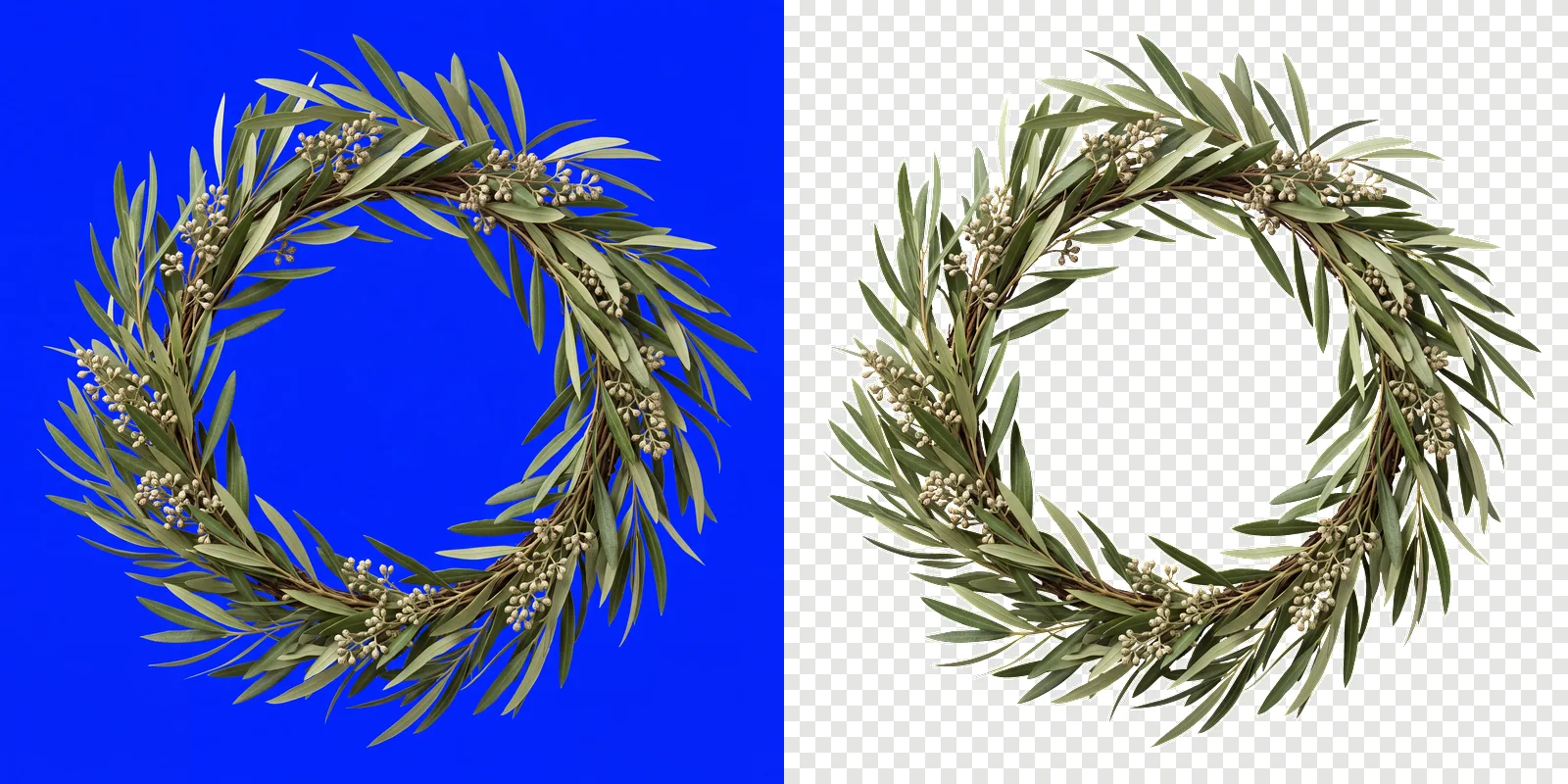
Use it on your own subject
The prompt above is one subject. For anything else, keep your own wording and paste this block on the end of it.
Isolated on a completely flat, uniform, solid pure blue (#0000FF) digital chroma-key background. The pure blue background fills the image edge to edge like a flat digital chroma-key screen with no gradient, staying at full brightness inside every gap and opening in the subject; no reflection or tint of pure blue on the subject. Every edge of the subject is crisp, sharp and hard against the pure blue, with no soft, blurry, feathered or glowing transitions, no depth-of-field blur, no haze or halo; inside every hole and gap the pure blue stays at full brightness right up to the edge. Shaded parts of the subject keep their own natural color, never a pure blue tint. Everything in sharp focus with deep depth of field, evenly lit with soft neutral studio light, no cast shadow, no contact shadow, no ambient occlusion, no bounce light. The entire subject is centered and completely inside the frame with at least 10% empty background margin on every side, nothing cropped or touching the image edges. No frame, no border, no paper, no mockup, no vignette, no text, no watermark, no deformed or duplicated parts. No floating or detached fragments, no stray specks, dust or debris anywhere on the background; every element is physically attached to the subject.
Then cut them out
Download the finished renders at full size and drop the lot into ClipBrook. Your images stay on your computer. Nothing is uploaded. Each one comes back as a PNG with a transparent background, with a badge naming the handful that need the red fallback.